Core quantization methods
These methods cover most enterprise and local-deployment needs.
Adapted for this playbook from the 🤗 Transformers documentation by Hugging Face. Official page: https://huggingface.co/docs/transformers/quantization/bitsandbytes. Images © Hugging Face (
documentation-images) unless noted. This is not a substitute for the upstream docs — verify against the current version.Covers Hugging Face pages: quantization/bitsandbytes, quantization/gptq, quantization/awq, gguf, quantization/torchao
bitsandbytes
Great for loading large models in 8-bit / 4-bit for inference or QLoRA-style fine-tuning.
from transformers import AutoModelForCausalLM, BitsAndBytesConfig

bnb = BitsAndBytesConfig(load_in_4bit=True)
model = AutoModelForCausalLM.from_pretrained(model_id, quantization_config=bnb, device_map="auto")
Docs: bitsandbytes.
GPTQ / AWQ
Popular post-training weight quantization formats for fast GPU inference. Prefer community-quantized Hub checkpoints when available, or follow the calibration recipes in GPTQ and AWQ.
GGUF
Widely used with llama.cpp and local UIs. See GGUF and the diagram below.
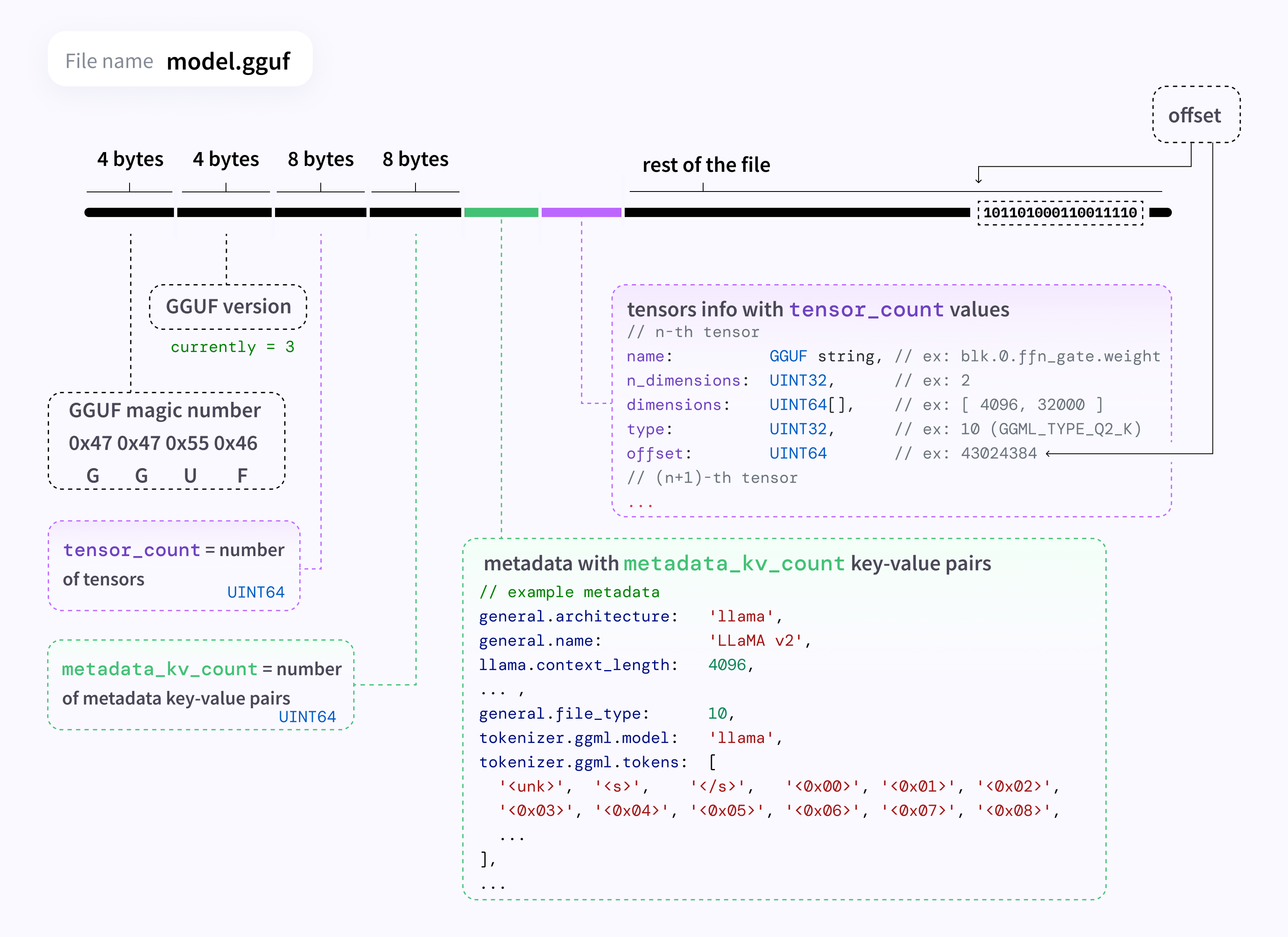
Source: Hugging Face documentation images.
torchao
PyTorch-native quantization / optimisation toolkit integrated with Transformers — torchao.
Selection cheat sheet
| Need | Start with |
|---|---|
| Fine-tune large LLM on 1–2 GPUs | bitsandbytes 4-bit + LoRA |
| Max GPU decode speed | AWQ / GPTQ (engine-dependent) |
| Laptop / CPU local chat | GGUF + llama.cpp |
| PyTorch-centric PTQ | torchao |
Discussion
Comments
Share feedback or questions about this page. No account required.
Loading comments…