Model Context Protocol (MCP)
MCP is an open-source standard for connecting AI applications to external systems.
Using MCP, AI applications like Claude or ChatGPT can connect to data sources (local files, databases), tools (search engines, calculators) and workflows (specialised prompts) — enabling them to access key information and perform tasks.
Think of MCP like a USB-C port for AI applications. Just as USB-C provides a standardised way to connect electronic devices, MCP provides a standardised way to connect AI applications to external systems.
Adapted for this playbook from the Model Context Protocol documentation (protocol revision path
2026-07-28). Official site: modelcontextprotocol.io. Selected diagrams from the MCP docs repository. This is not a substitute for the upstream docs — always verify against the current specification.
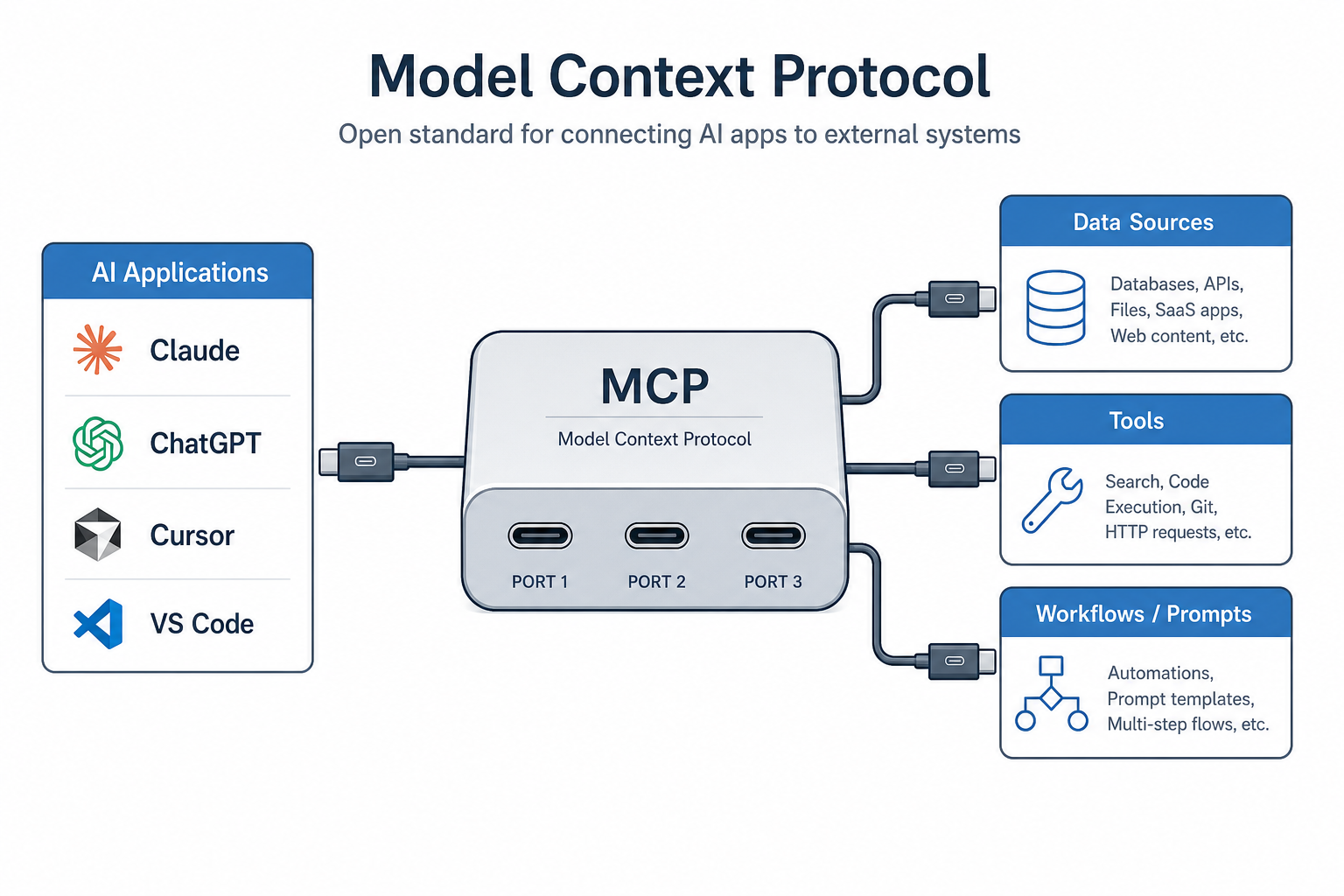
MCP as the standardised connector between AI hosts and external capabilities. Source: Model Context Protocol documentation / playbook diagram.

Source: modelcontextprotocol/docs hero-light.svg.
What can MCP enable?
- Agents can access Google Calendar and Notion, acting as a more personalised AI assistant.
- Claude Code can generate an entire web app from a Figma design.
- Enterprise chatbots can connect to multiple databases across an organisation so users analyse data in chat.
- AI models can create 3D designs in Blender and send them to a 3D printer.
Why MCP matters
| Audience | Benefit |
|---|---|
| Developers | Less custom integration work when building or connecting AI apps and agents |
| AI applications / agents | Access to an ecosystem of data sources, tools and apps |
| End users | More capable assistants that can use your data and take actions when needed |
Broad ecosystem support
MCP is an open protocol supported across a wide range of clients and servers. AI assistants like Claude and ChatGPT, development tools like Visual Studio Code, Cursor, MCPJam, and many others support MCP — build once, integrate everywhere.
Source: Model Context Protocol docs (og-image.png).
How this playbook maps to official MCP docs
| Playbook section | Official docs area | Start here |
|---|---|---|
| Learn · Architecture | Architecture overview | Architecture |
| Learn · Servers | Tools, resources, prompts | Server concepts |
| Learn · Clients | Elicitation, roots, sampling | Client concepts |
| Learn · Versioning | YYYY-MM-DD revisions | Versioning |
| Develop · Build a server | First server tutorial | Build a server |
| Develop · Build a client | Host / client tutorial | Build a client |
| Develop · Agent Skills | Guided server design | Agent Skills |
| Develop · Local servers | Claude Desktop + stdio | Connect local |
| Develop · Remote servers | Streamable HTTP | Connect remote |
| Develop · Client best practices | Scaling hosts | Best practices |
| SDKs | Official language SDKs | SDKs |
| Tools · Debugging | Debug toolkit | Debugging |
| Tools · Inspector | Interactive tester | Inspector |
| Security · Authorization | OAuth 2.1 | Authorization |
| Security · Best practices | Attack surface | Security practices |
| Extensions | Optional capabilities | Extensions |
| Registry | Public server metadata | Registry |
| Specification | Normative protocol | Specification |
Credit policy
Every page in this section:
- Credits the Model Context Protocol project and links to the official doc URL
- Hosts selected diagrams from the official docs repository (and playbook diagrams where noted)
- Rewrites content for playbook clarity (British spelling, enterprise notes) rather than dumping the full multi-language tutorial verbatim
- Does not replace upstream docs — verify against modelcontextprotocol.io
Learning path
- Architecture → Server concepts → Client concepts
- Build a server then connect it locally
- Validate with the MCP Inspector
- Harden with authorization and security best practices
- Publish metadata via the Registry when ready
Official “Start building” links
- Build servers — expose your data and tools
- Build clients — applications that connect to MCP servers
- Build MCP Apps — interactive UIs inside AI clients
- Architecture — core concepts
Discussion
Comments
Share feedback or questions about this page. No account required.
Loading comments…