Coding Agents Best Practices I: Plan First, Code Second
Ask-and-pray prompts turn frontier models into expensive autocomplete. The teams that ship consistently do the opposite: they force research and a reviewable plan before any file write. This article is Part I of a four-part series on working with coding agents in production.
1. Why planning beats faster typing
An agent harness is instructions + tools + model. Cursor and Claude Code both run agentic loops that read files, edit, run shell, and iterate. Autonomy does not remove ambiguity — it multiplies it.
If each unguided decision is roughly 80% “right enough,” twenty decisions in a feature give:
[ 0.8^20 \approx 0.01 ]
About a 1% chance the whole feature lands correctly without human course-correction. Planning does not make the model smarter; it moves those decisions into a reviewed document where each call approaches ~100% because you made it.
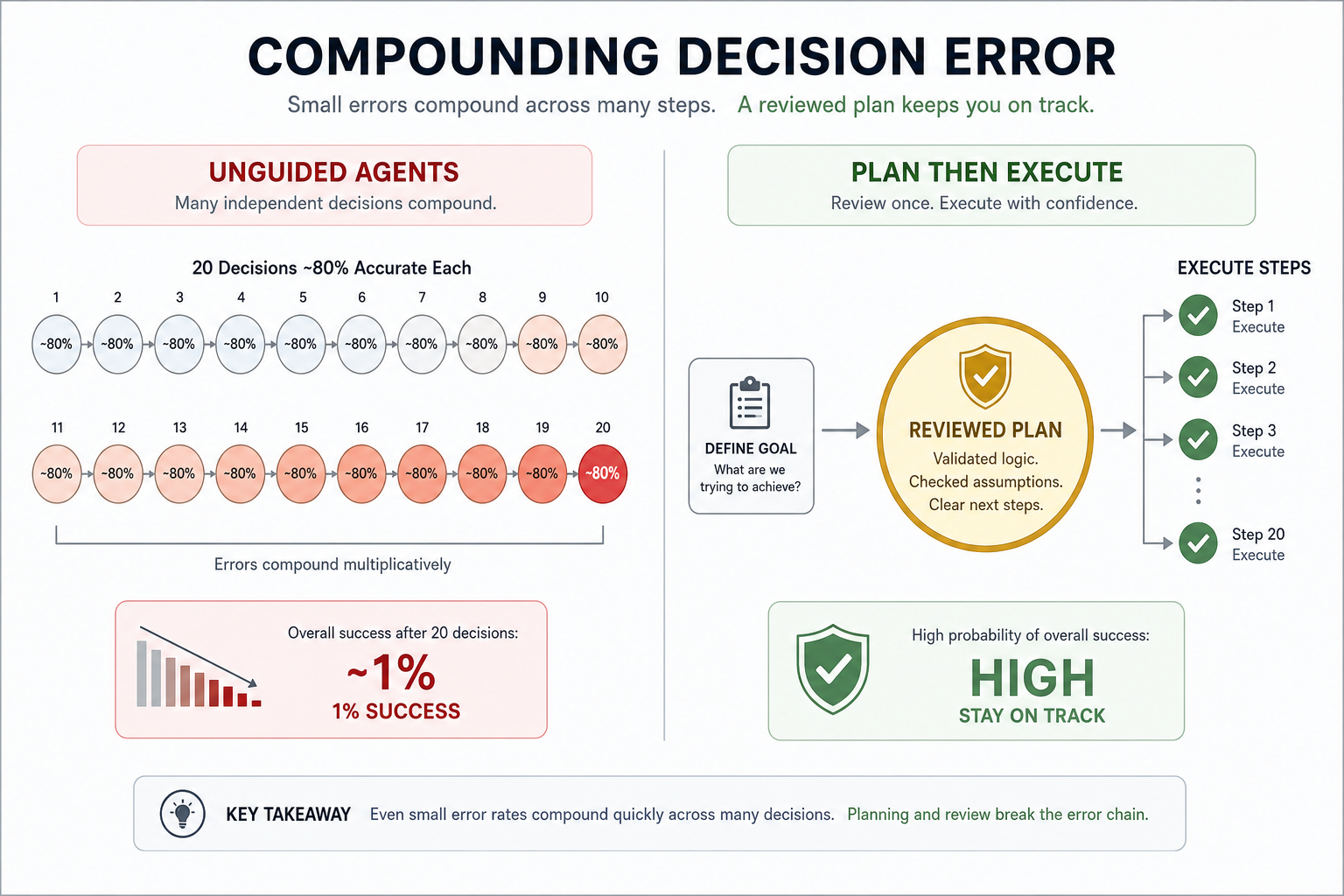
That is why Cursor’s agent guide and Anthropic’s Claude Code best practices both put “start with plans / explore then plan then code” at the top of the stack — not as ceremony, but as error control.
2. The harness mindset
Before specific UI tricks, internalise three roles:
| Role | You do | Agent does |
|---|---|---|
| Specifier | Outcome, constraints, out-of-scope, acceptance | Research and draft plan |
| Architect | Approve / edit plan | Stay in read-only until approved |
| Reviewer | Read diffs, demand evidence | Implement against the plan and checks |
Treat the agent like a very fast junior engineer: high throughput, weak memory of your product intent unless you write it down.
Sources worth bookmarking:
3. Plan Mode in practice
Cursor
Press Shift+Tab in the agent input to toggle Plan Mode. The agent should:
- Research the codebase for relevant files
- Ask clarifying questions
- Produce a detailed plan with paths and references
- Wait for approval before building
Plans open as Markdown you can edit — delete fluff, add constraints, point at the canonical example file. Use Save to workspace so plans land in .cursor/plans/ for resume, handoff, and future agents.
Claude Code
Cycle permission modes with Shift+Tab until plan mode is on (claude --permission-mode plan at startup, or /plan). Same contract: read and analyse, no writes. Open the plan in an editor with Ctrl+G, refine, then approve and implement.
When to skip
Skip Plan Mode when you could describe the diff in one sentence: typo, rename, single log line, known one-file fix. Planning adds overhead; use it when approach uncertainty, multi-file blast radius, or unfamiliar code is present.
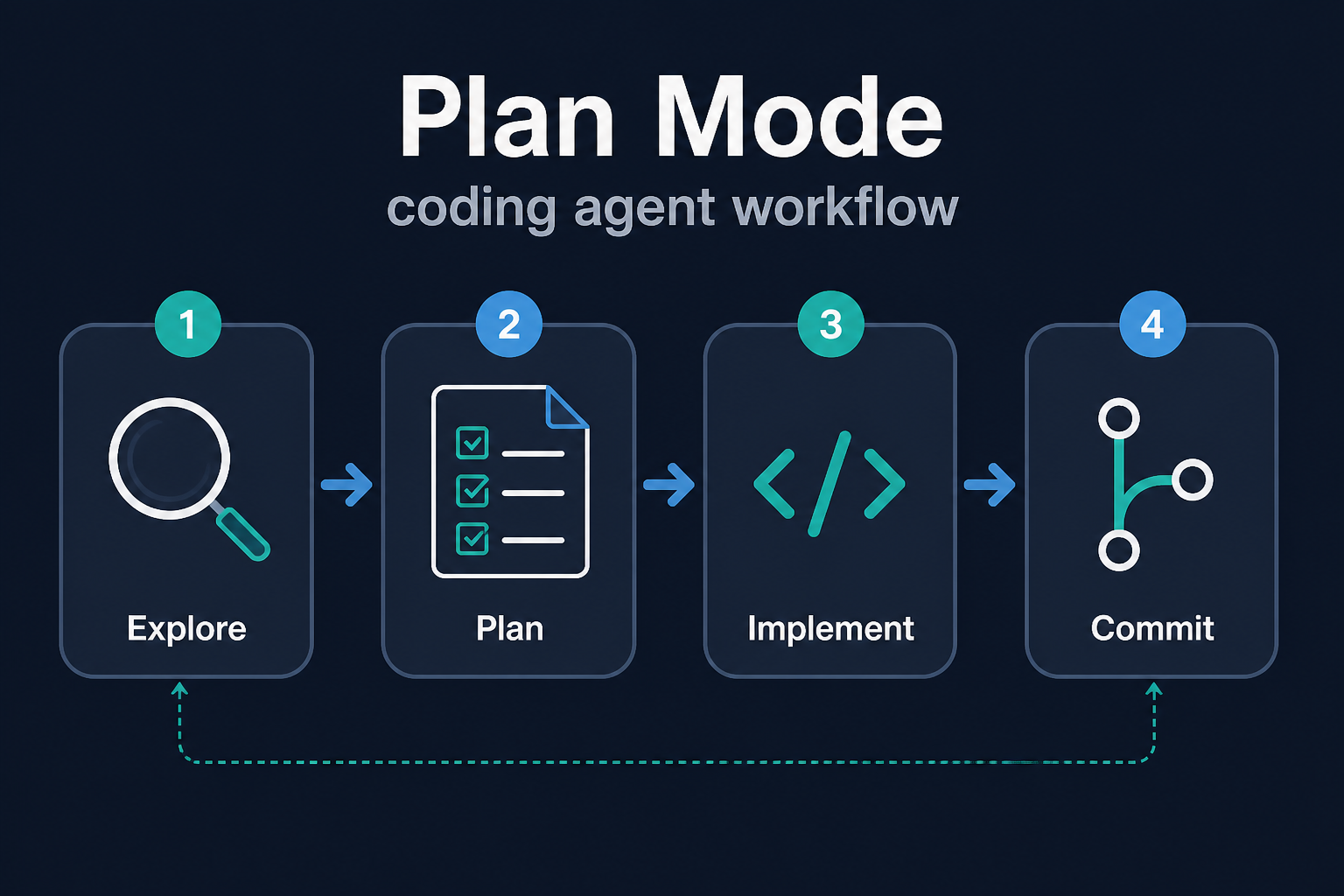
4. Explore → Plan → Implement → Commit
Anthropic’s recommended loop maps cleanly onto Cursor as well:
Phase 1 — Explore (read-only)
Read src/auth and explain how sessions and login work.
Also map how we load secrets from environment variables.
Do not modify files.
Goal: shared map of reality before proposing a design.
Phase 2 — Plan
I want Google OAuth. Which files change? What is the session flow?
Write a step-by-step plan with acceptance criteria and a test plan.
Do not implement yet.
Push clarifying questions hard:
Before you finalise the plan, interview me with the hardest questions
about requirements, edge cases, and tradeoffs. Do not assume defaults.
Phase 3 — Implement
Leave plan mode. Instruct the agent to follow the plan, not reinvent:
Implement the OAuth flow from PLAN.md.
Write tests for the callback handler.
Run the suite and fix failures. Do not expand scope.
Prefer one slice at a time (stub → fill endpoints → wire UI) over “build the whole thing.”
Phase 4 — Commit
Ask for a descriptive commit (and PR when ready). Prefer human-gated commits for production repos; automated commit-via-agent is fine only with CI and review as the real gate.
5. The annotation cycle
For large features, conversation-only plans are thin. Production teams use a file-based annotation loop:
- Agent writes
plan.md - You open it and add inline notes (
> NOTE: use drizzle:generate, not raw SQL) - Reply: “Address all notes, don’t implement yet.”
- Repeat until no ambiguity remains
- Only then: implement
The guard phrase matters. Without “don’t implement yet,” many sessions skip straight to code.
Example fragment:
## Step 3: Database migration
Create a migration for the users table.
> NOTE: use drizzle:generate, not raw SQL
> NOTE: add created_at with default NOW()

## Step 4: API endpoint
Add PUT /users/:id
> NOTE: PATCH, not PUT. Partial updates only.
Two-hour specs routinely save multi-hour thrash when the blast radius is large.
6. Persist plans as working memory
Chat history is a terrible sole source of truth. Persist:
| File | Purpose |
|---|---|
plan.md / .cursor/plans/* | Master checklist |
architecture.md | High-level design notes for the change |
decisions.md | Choices and rejected alternatives |
todo.md | Current slice |
When a session goes sideways, revert code, refine the plan, re-run — usually faster and cleaner than stacking corrective prompts on a polluted transcript.
7. Prompt patterns that sharpen plans
| Weak | Strong |
|---|---|
| “Add auth” | “Add email/password login only. No social. Sessions in Redis matching src/auth/session.ts. Out of scope: SSO.” |
| “Improve the API” | “Add PATCH /users/:id for displayName and avatarUrl. Match handler style in src/api/orgs.ts. Fail with 404 if missing.” |
| “Fix the bug” | “After 30m idle, refresh fails. Reproduce in src/auth/, write a failing test, then fix root cause.” |
Point at existing patterns (HotDogWidget.php style) instead of abstract style essays. Paste screenshots or @ files rather than retyping.
8. Starting over is a feature
If the implementation misses the intent:
- Stop / Escape
- Revert the bad edits (git or rewind)
- Tighten the plan
- Re-execute
Wrestling a confused mid-flight agent is usually slower than a clean second pass from a better plan.
9. Checklist — Part I
- Outcome, constraints, and out-of-scope written before tools edit
- Plan Mode used for multi-file / uncertain work
- Clarifying questions answered (or annotation cycle completed)
- Plan saved in the workspace
- Implementation prompted against the plan, one slice at a time
- Commits small enough to revert
10. Series map
| Part | Topic |
|---|---|
| I (this article) | Plan-first workflow |
| II | Context windows, rules, CLAUDE.md, skills |
| III | Verification, TDD, hooks |
| IV | Parallel agents, review, failure patterns |
Next: keep the agent’s memory small, structured, and progressive — or plans will still rot mid-session.
Discussion
Comments
Share feedback or questions about this page. No account required.
Loading comments…