Coding Agents Best Practices IV: Parallel Agents, Review, and Failure Patterns
One disciplined agent is leverage. Ten undisciplined agents are a tax. Part IV covers parallel execution, cloud delegation, independent review, and the failure patterns that turn agentic coding into expensive thrash.
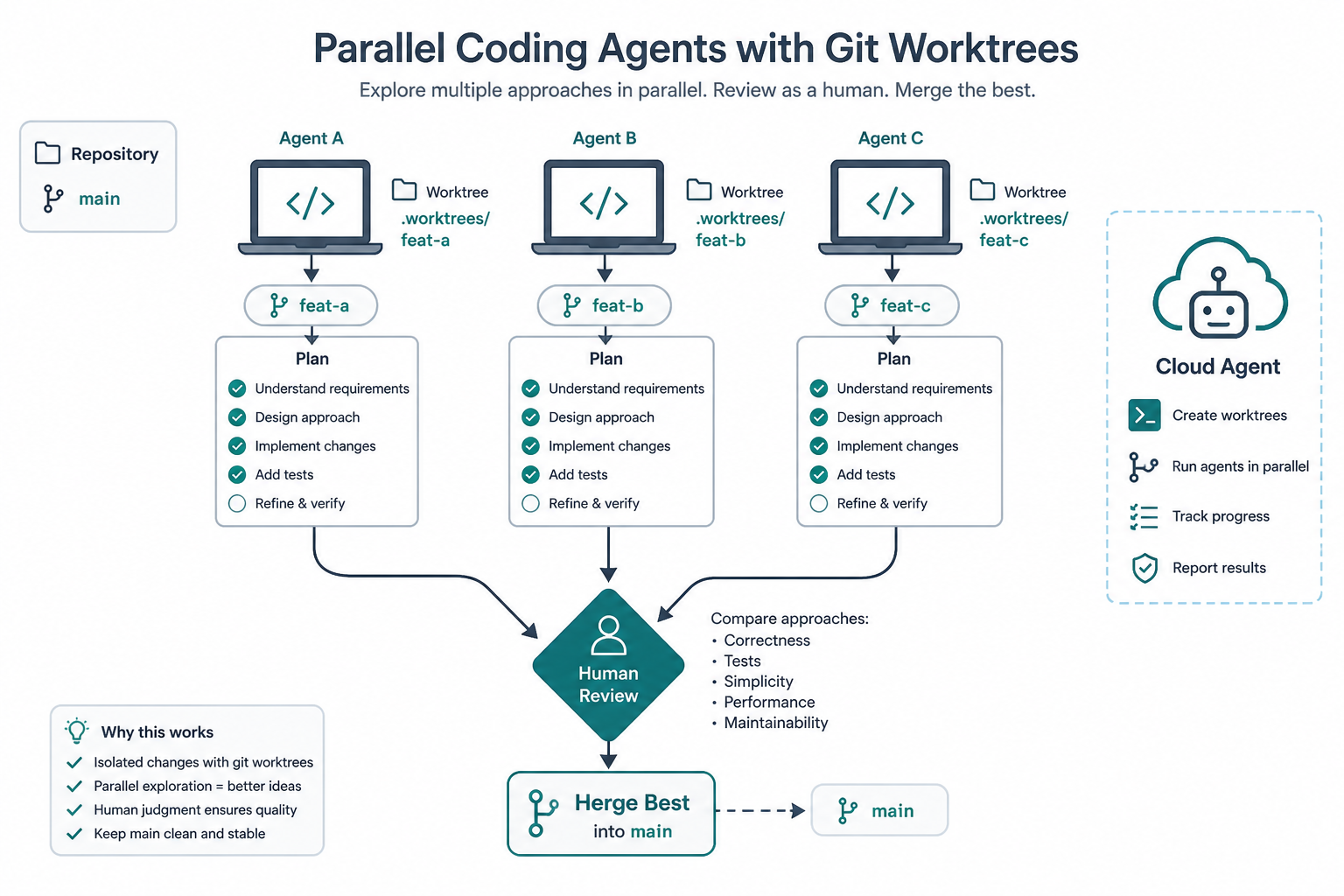
1. Scale the loop, not the vibes
Parts I–III give you a single trustworthy loop:
Explore → Plan → Implement → Verify → Commit
Parallelism multiplies whatever you already do. If that loop is weak, N agents produce N× larger messes. If it is strong, worktrees and cloud sessions turn backlog into reviewable diffs.
Official anchors:
2. Parallel worktrees
Cursor can manage git worktrees so each agent has an isolated tree. Claude Code documents worktrees and desktop multi-session the same way: separate checkouts, no colliding edits.
Practical patterns:
| Pattern | How |
|---|---|
| Feature fan-out | One agent per ticket/branch |
| Competing approaches | Same prompt, different strategies; you pick |
| Multi-model race | Same prompt across models; compare diffs |
| Safe experiments | Risky refactor in a throwaway worktree |
When an agent finishes, apply/merge deliberately. Configure notifications so finished sessions don’t sit unnoticed.
Commit at logical checkpoints inside each worktree — revertible steps beat archaeology.
3. Cloud agents and async backlog
Cloud agents (Cursor cloud, Claude Code on the web / routines) fit work you would stick on a todo list:
- Opportunistic bug fixes discovered mid-feature
- Tests for existing modules
- Docs and comment passes
- Dependency bumps one at a time with test runs
Lifecycle:
- Describe task + constraints + verification
- Agent clones, branches, works in a sandbox
- Opens a PR
- You review on web/mobile later
Trigger from editor, web, phone, or Slack (@Cursor-style integrations). Close the laptop; do not skip PR review.
Headless / CI mode (claude -p, allowed-tools scoping) is for scripted fans of the same pattern with narrower permissions.
4. Writer / reviewer and adversarial checks
The implementer is biased toward its own code. Fresh context removes that bias.
| Session A (Writer) | Session B (Reviewer) |
|---|---|
Implements rate limiter per PLAN.md | Reviews only the diff + plan for gaps, races, pattern drift |
| Addresses findings | Optional second pass |
Prompt the reviewer for gaps that affect correctness or requirements, not style olympics — otherwise you get endless over-engineering.
Bundled review skills (/review, /code-review, Cursor Agent Review / Bugbot) institutionalise this without opening a second terminal every time.
5. Fan-out migrations
Large migrations:
- Have an agent list targets into
files.txt(scoped probe first) - Refine the prompt on 2–3 files
- Loop non-interactive agents per file with tight
--allowedTools - Aggregate failures for a human triage pass
Never start 2,000 unscoped agents against a vague “migrate everything” prompt.
6. What to automate vs supervise
| Automate aggressively | Keep human-in-the-loop |
|---|---|
| Formatting, lint autofix | AuthZ / AuthN changes |
| Single-file refactors with tests | Schema migrations with data risk |
| Issue → PR for well-specified bugs | Secrets, billing, destructive ops |
| Doc sync from code | Architecture that locks multi-tenant boundaries |
Permissions and org control planes matter more as agent count grows: deny-by-default tool access, audit logs, and cost caps.
7. Failure patterns field guide
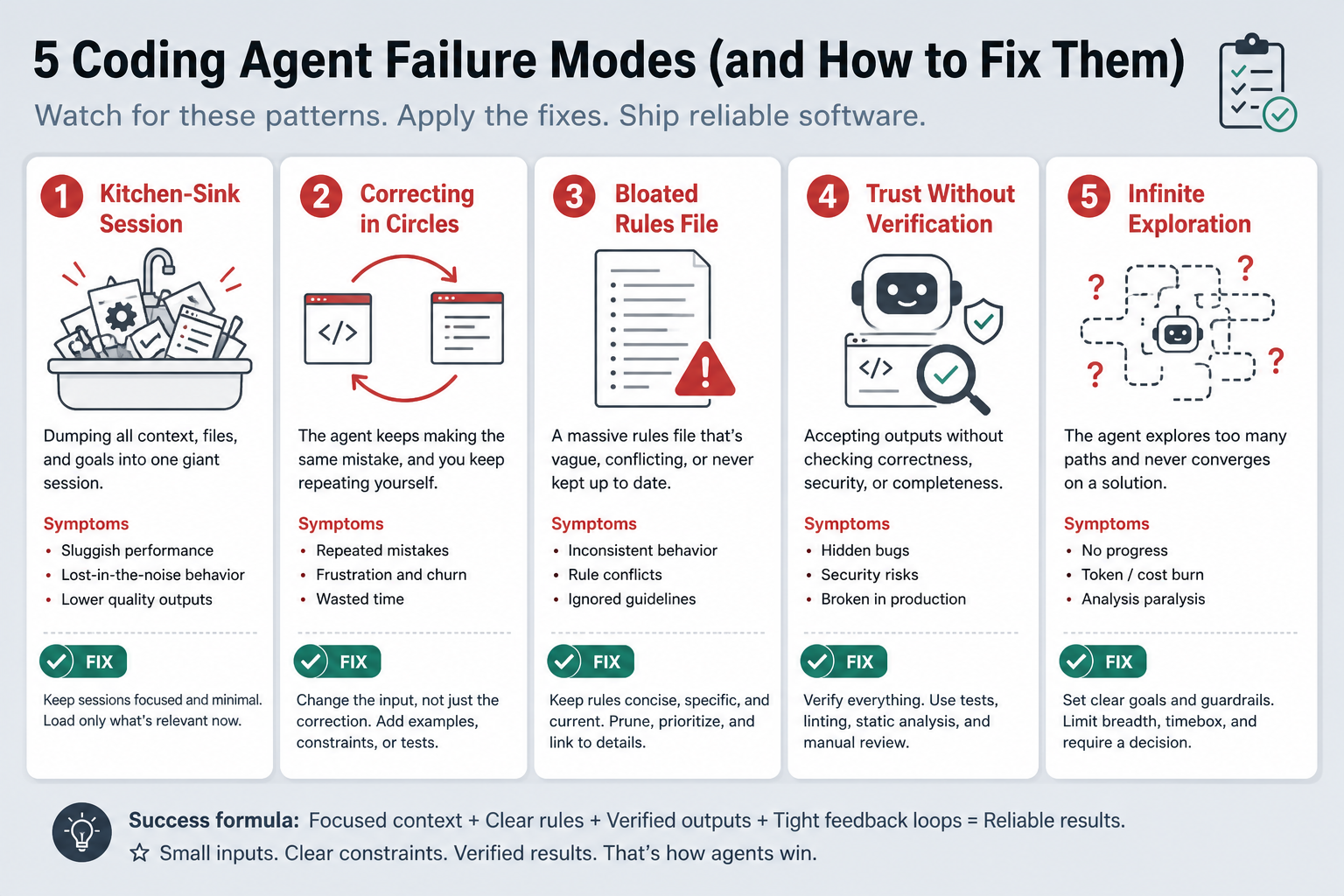
Kitchen-sink session
Unrelated tasks in one chat pollute later reasoning.
Fix: /clear or new conversation per task.
Correcting in circles
Failed attempts remain in context; each “fix” digs deeper.
Fix: After two failures, Document & Clear; rewrite the prompt with lessons.
Bloated rules / CLAUDE.md
Everything weighted equally → nothing followed reliably.
Fix: Prune to <100 high-signal lines; progressive disclosure (Part II).
Trust without verification
Plausible code, wrong edges.
Fix: Tests/build/screenshot oracles (Part III). Don’t ship what you can’t check.
Infinite exploration
“Investigate the codebase” without scope fills the window.
Fix: Bound the question or use research subagents that return summaries.
Other burns
- Over-engineering / unsolicited abstractions → “simplest approach that passes tests”
- Hallucinated APIs in unfamiliar stacks → only agent-code stacks you can verify
- Irreplaceable asset deletion → backups + path deny rules before access
- Scope escalation mid-flight → Escape, rewind, re-plan
Anthropic’s honest advice for sessions that go sideways: save state, let it run, then accept or restart — don’t endlessly wrestle.
8. Copy-paste session checklist
Use as a prompt preamble or AGENT_SESSION.md:
Goal: <one sentence>
Acceptance criteria:
1. ...
2. ...
3. ...
In scope files: ...
Out of scope: ...
Plan first: yes / no
Verification: <test command / build / screenshot>
Security: no secrets in prompts; auth changes need human review
Output: summary + file list + evidence of checks
9. Developing intuition
Experienced agent users share traits Cursor highlights:
- Specific prompts with file, scenario, and test shape
- Rules grown from observed mistakes, not speculative encyclopedias
- Careful diff review — speed raises review importance
- Verifiable goals (types, linters, tests)
- Collaborative stance: ask for plans, push back, interrupt early
Patterns evolve with models; judgment about when to plan, clear, or parallelise does not.
10. Series wrap-up
| Part | Habit |
|---|---|
| I — Plan first | Collapse ambiguity before edits |
| II — Context & rules | Keep memory small and progressive |
| III — Verify & hooks | Give the agent an external oracle |
| IV — Scale & review | Multiply trustworthy loops; reject noisy ones |
If you pick one change this week: run your next multi-file feature entirely through Plan Mode, save the plan, implement against it, and refuse “done” without test or build evidence. Parallel agents come after that muscle memory.
Further reading in this playbook: Claude Code How-To, Building production-grade AI agents, Claude Certified Architect foundations.
Discussion
Comments
Share feedback or questions about this page. No account required.
Loading comments…