Coding Agents Best Practices II: Context, Rules, and Progressive Memory
Context is the scarce resource in every coding agent session. Instructions, file reads, tool schemas, MCP servers, and your chat history all compete for the same window — and quality degrades before the hard limit. Part II covers how Cursor and Claude Code expect you to structure rules, skills, and session hygiene.
1. The real constraint: the window fills and attention thins
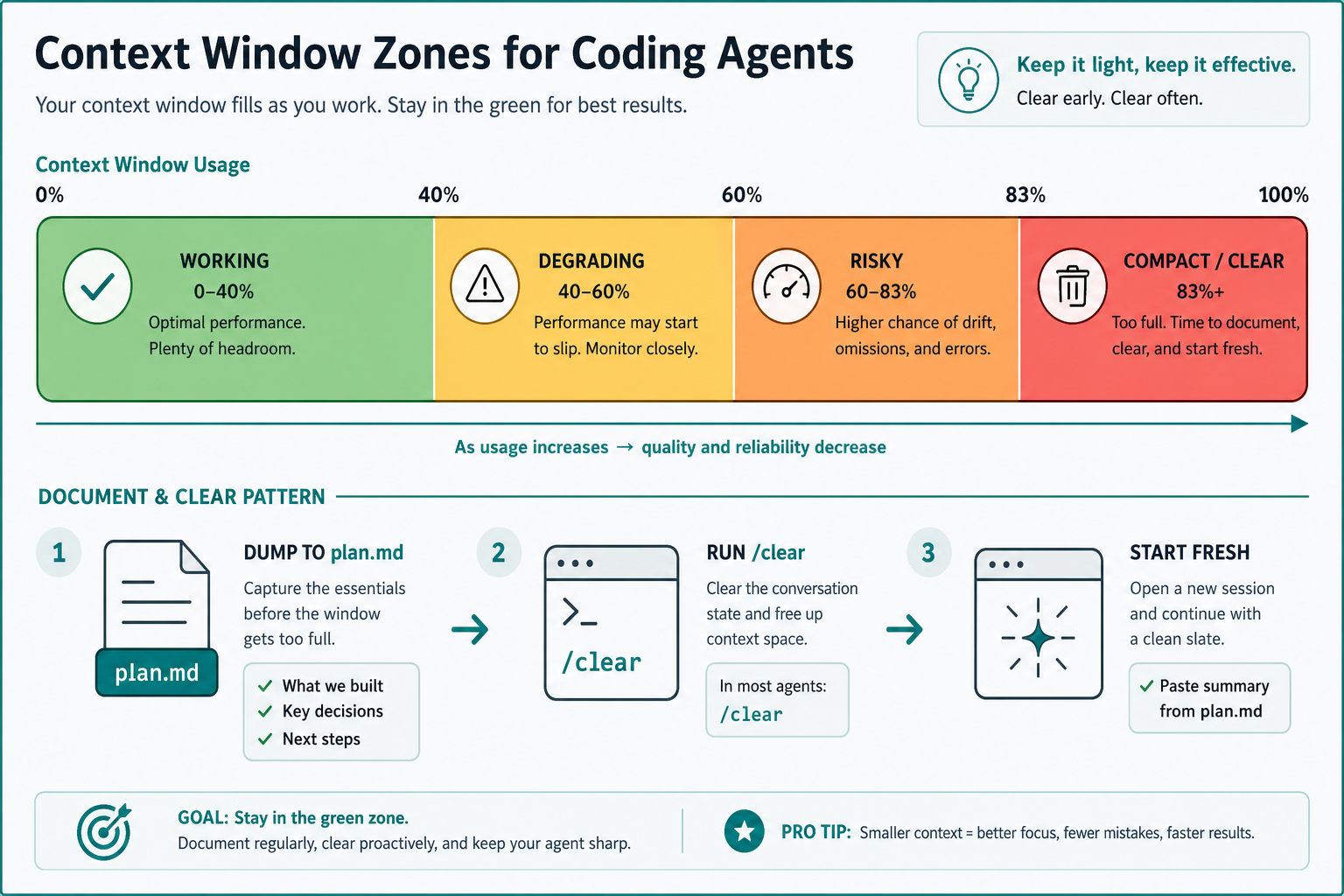
Claude Code’s docs state the core bluntly: best practices mostly exist because the context window fills fast and performance degrades as it fills. Cursor’s agent guide makes the same operational point: long conversations accumulate noise; when effectiveness drops, start fresh.
Typical loadouts before you type anything:
- System prompt + tool definitions
- Project rules /
CLAUDE.md - MCP tool schemas (each server permanently eats budget — keep the set small)
Practitioners converge on a soft rule: don’t let working context sit past ~60% when you still need deep reasoning. Auto-compaction exists, but it is lossy — migration rationale and subtle decisions often disappear.
2. Static rules vs dynamic skills
Both Cursor and Claude Code split “always on” from “load when relevant”:
| Mechanism | Cursor | Claude Code | Use for |
|---|---|---|---|
| Always-on instructions | .cursor/rules/*.md | CLAUDE.md (+ hierarchy) | Build/test commands, hard constraints, pointers |
| On-demand packages | Agent Skills (SKILL.md) | Skills in .claude/skills/ | Domain workflows, slash commands |
| Deterministic automation | Hooks | Hooks | Must-never-skip checks (Part III) |
| External systems | MCP | MCP | Issue trackers, design, observability |
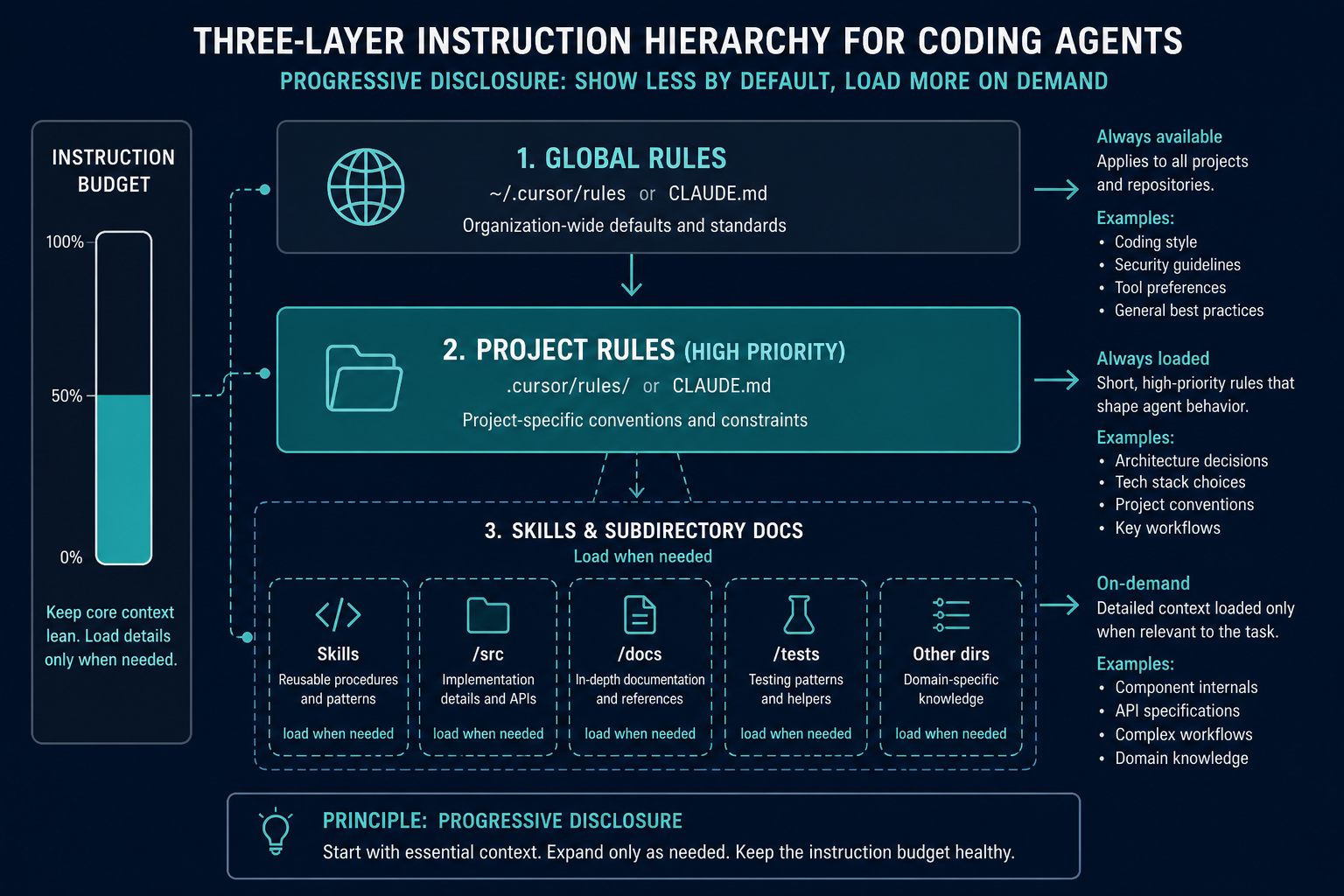
Rules shape every turn. Skills preserve budget by staying out of context until relevant. That progressive disclosure is how monorepos stay governable.
3. Write a rules file that earns its place
What belongs
# Commands
- npm run typecheck
- npm test -- path/to/file.test.ts  (prefer single files)
- npm run lint

# Style that differs from defaults
- ES modules only
- See src/components/Button.tsx for canonical components

# Workflow
- Typecheck after a series of edits
- API routes live under app/api/ matching existing patterns
- Never invent env var names — read .env.example
What does not
- Entire style guides (use linters/formatters)
- Tutorials and long API docs (link instead)
- “Write clean code” platitudes
- Edge cases that almost never apply
@-embedding huge files into the always-on file (burns budget every session)
Cursor’s guidance: start simple; add a rule only when the agent makes the same mistake twice. Claude Code’s test for each line: “Would removing this cause mistakes?” If not, delete it.
Community analyses of instruction following often cite a rough ~100–150 usable instruction slots after the system prompt — long files bury the rules that matter. Keep root files under ~60–100 lines of real constraints; park domain detail in referenced docs.
Hierarchy (Claude Code) / layers (Cursor)
- User/global rules for personal defaults
- Project root for team conventions (check into git)
- Subdirectory / path-scoped rules when only that package needs them
- Personal local overrides (
CLAUDE.local.md) gitignored
Progressive references from a lean root:
When working on payments, first read docs/payment-architecture.md.
Git workflow: @docs/git-instructions.md
Prefer pointers over paste. Stale copied content is worse than a link.
4. Let the agent find context — carefully
You do not need to manually @ twenty files. Semantic search and grep exist for a reason.
- Know the exact file → tag it
- Know the concept → describe it; let search locate it
- Irrelevant files confuse priority
Cursor extras like @Branch (“review changes on this branch”) and @Past Chats (selective read of prior sessions) beat dumping entire transcripts.
Pipe logs and paste screenshots when a wall of prose would fail. For Claude Code, cat error.log | claude and image paste are first-class.
5. Session hygiene: clear beats compact when quality drops
| Situation | Action |
|---|---|
| New unrelated task | New chat / /clear |
| Same feature, iterating | Continue |
| Agent loops on a wrong assumption | /clear + sharper prompt (do not stack corrections) |
| Long but coherent session | /compact with a focus hint, or selective rewind summarize |
| Critical decisions made | Dump to plan.md / progress.md before compact/clear |
Document & Clear pattern
- Write current plan, decisions, open questions, and file list to Markdown
/clear(or new conversation)- Start with “Read PROGRESS.md and continue”
- Optional: a
/catchupcommand that diffs againstmainand summarises branch state
You control what survives. Auto-compaction does not.
After two failed corrections on the same issue, clear and rewrite the prompt with what you learned — a polluted window almost never recovers.
6. Skills and reusable commands
Package repeatable workflows as skills/commands checked into git:
Examples (both ecosystems):
/pr— commit, push, open PR withgh/fix-issue 1234— fetch issue, implement, test, PR/review— linters + risk summary/catchup— rebuild context after clear
Skills can include hooks and domain knowledge without loading them every session. Keep disable-model-invocation (or equivalent) for side-effect-heavy flows you want to trigger manually.
7. MCP and CLI: cost vs power
MCP is excellent for Jira, Figma, Datadog, Supabase, etc. Each server adds schema weight. Practical limit for quality work is often a handful of servers, not dozens.
Prefer CLI tools (gh, aws, gcloud, sentry-cli) when they cover the need — usually fewer tokens than MCP schemas for the same action. Teach unfamiliar CLIs with --help in-session.
8. Tuning when rules are “ignored”
If Claude or Cursor stops following a rule:
- Confirm the file still loads (
/contextin Claude Code) - Shorten the rules file — buried rules lose weight
- Strengthen only critical lines (“MUST”, “IMPORTANT”) sparingly
- Convert safety rules to hooks (Part III) — advisory text is ~70% followed; hooks are 100% when configured
- Add the mistake as a new line only after you observe the failure
Treat rules like production config: review after incidents, prune regularly, observe behaviour.
9. Checklist — Part II
- Root rules under ~100 lines of high-signal constraints
- Domain docs referenced, not inlined
- Skills/commands for repeat workflows
- MCP inventory limited; CLIs preferred where equal
- Unrelated tasks get a fresh session
- Progress files written before clear/compact on heavy work
- Rules checked into git for the team
10. Series map
| Part | Topic |
|---|---|
| I | Plan-first workflow |
| II (this article) | Context, rules, memory |
| III | Verification, TDD, hooks |
| IV | Parallel agents, review, failure patterns |
Next: give the agent an oracle it cannot talk itself out of — tests, builds, and hooks.
Discussion
Comments
Share feedback or questions about this page. No account required.
Loading comments…