From Simple Prompts to Powerful Workflows: How to Use Claude, Claude Design and Skills Effectively
Using Claude only as a question-and-answer chatbot is like buying a powerful computer and using it only as a calculator. The real value appears when you organise Claude around your actual workflow — and give each part of that workflow a proper home instead of one giant prompt.
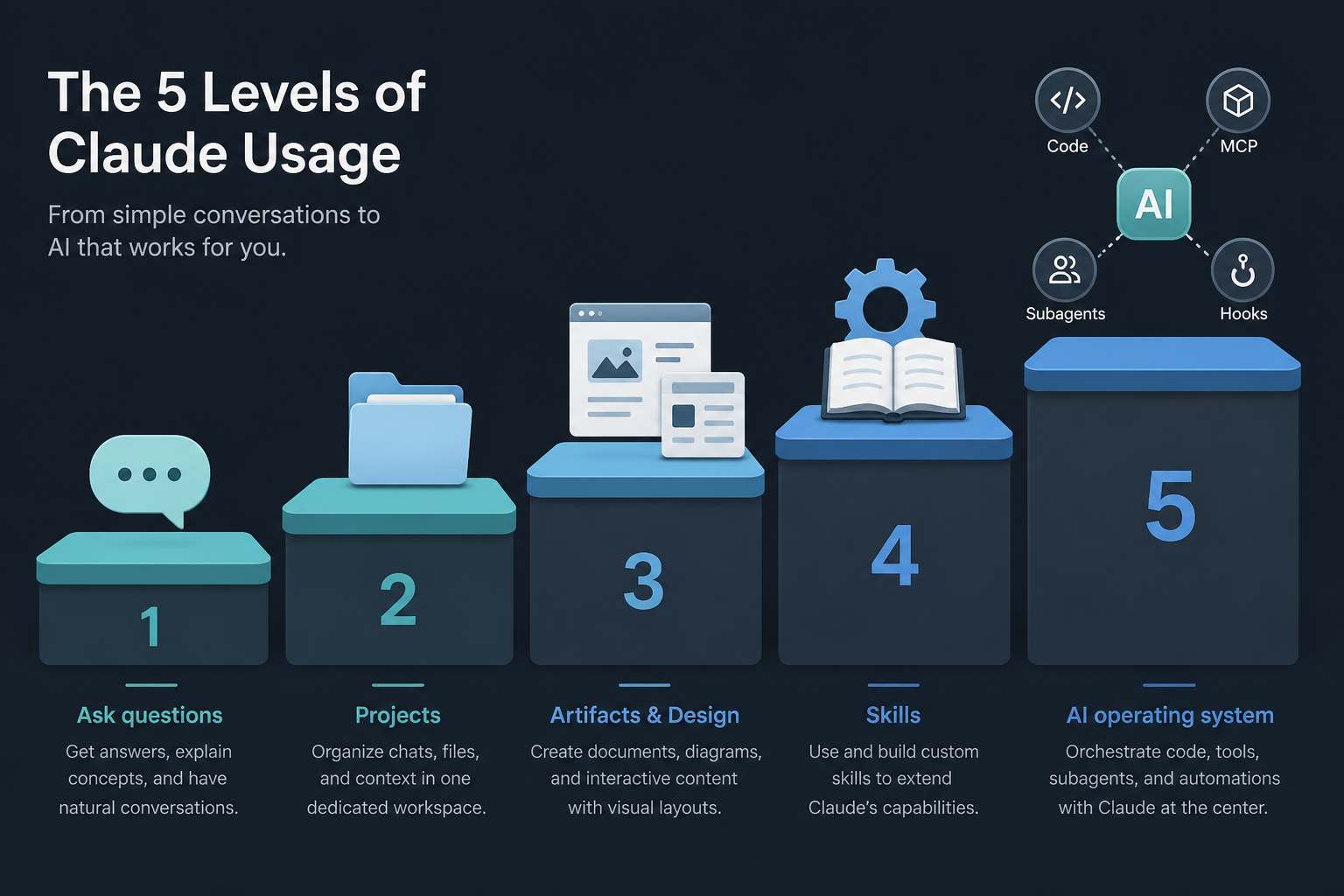
1. The five levels of Claude usage
You do not need every feature at once. A normal user can benefit from Projects and Skills without writing code. A developer can progressively add Claude Code, MCP, subagents and automation.
| Level | What you do | Typical tools |
|---|---|---|
| 1. Ask | One task at a time | Structured prompts |
| 2. Organise | Persistent context for an area of work | Projects, Project instructions |
| 3. Reuse outputs | Build tools and visuals others can use | Artifacts, Claude Design, files |
| 4. Teach process | Encode how a recurring task should run | Skills (SKILL.md) |
| 5. Operating system | Agent in the repo + tools + guards | Claude Code, CLAUDE.md, MCP, subagents, hooks |
The objective is not to rush to Level 5. Use the simplest level that solves the problem reliably.
2. Level 1: Better prompts
Most Claude problems begin with vague requests such as “Write a proposal for an AI chatbot.” Claude must guess audience, industry, depth, platform, risks and format — so the answer sounds professional and stays generic.
Prompt structure
- Task — what Claude should do
- Context — what Claude needs to know
- Audience — who will read or use it
- Requirements — what must be included
- Constraints — what to avoid
- Output — how the answer should be organised
Weak vs strong
Weak: “Write a project update.”
Strong:
Write a weekly project update for my manager. This week I completed the login flow, fixed two notification bugs and moved analytics into code review. The mobile layout is delayed because the API response format changed. Keep under 180 words. Professional but natural. Sections: completed, blocker, next steps. Do not make the delay sound dramatic.
Reusable template
Act as a [role].

Help me [specific task].

Context:
[Relevant background]

Audience:
[Who will read or use it]

Include:
- [Requirement 1]
- [Requirement 2]
- [Requirement 3]

Constraints:
- [Constraint 1]
- [Constraint 2]

Output:
[Required format]

Before finalising, check that the output is:
- Accurate
- Clear
- Practical
- Appropriate for the audience
Clear context and a clear deliverable usually matter more than clever wording.
3. Level 2: Projects instead of restarting
A Claude Project is a dedicated workspace with its own chats, knowledge and instructions. Think of it as a room for one area of work — not a dumping ground called “My Work” that mixes university notes, travel plans and architecture diagrams.
Better organisation examples
| Project | Knowledge to store |
|---|---|
| AI Solution Engineering | Architecture principles, discovery templates, security, HLD examples |
| Product Development | Vision, personas, journeys, backlog, API docs, design system |
| Blog and Research | Style, audience, editorial rules, citation rules, topics covered |
| University Study | Syllabus, notes, marking schemes, common mistakes |
Knowledge vs instructions vs prompt vs Skill
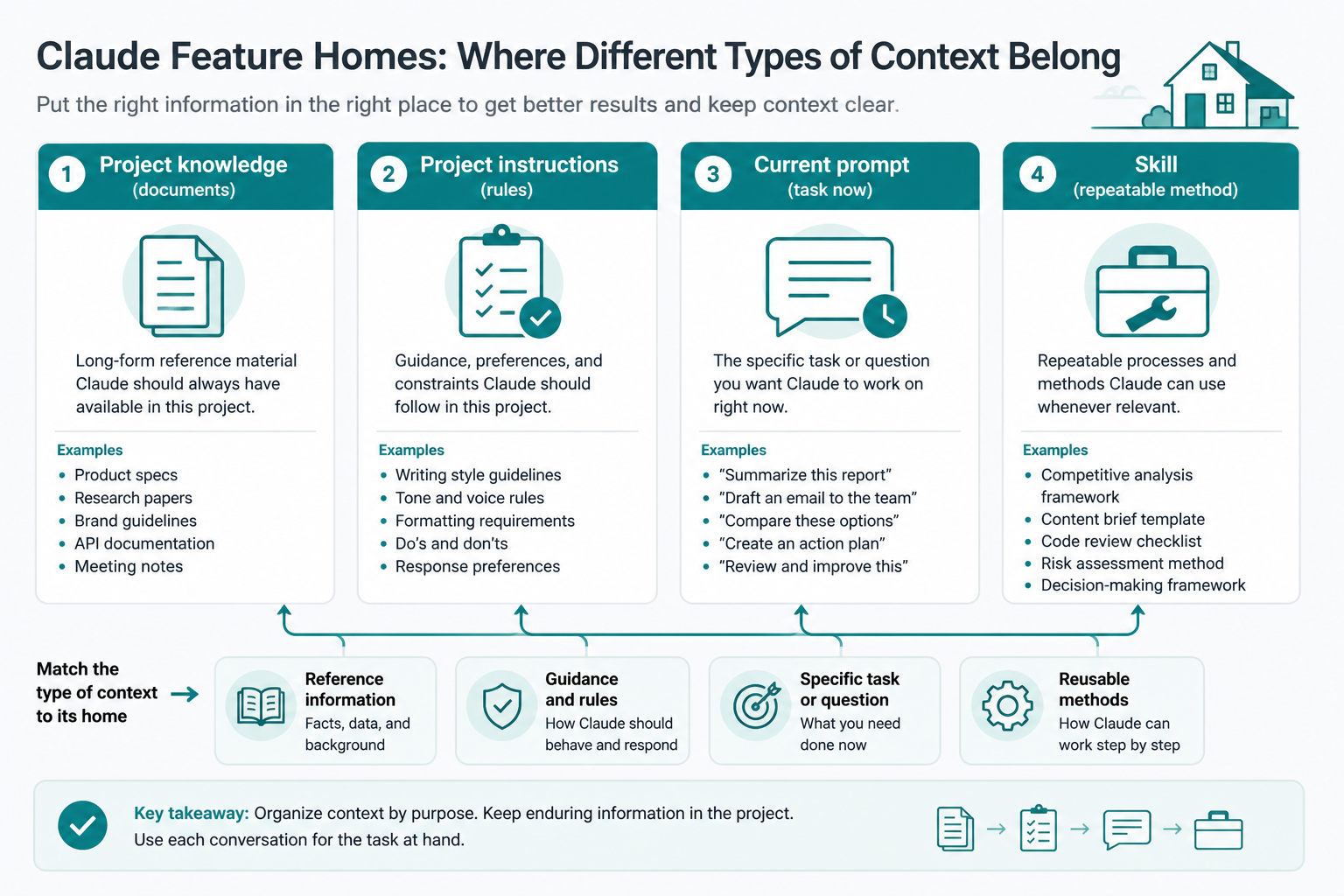
| Home | Holds |
|---|---|
| Project knowledge | What Claude should know (library, not storage bin) |
| Project instructions | How Claude should behave in this workspace |
| Current prompt | What Claude should do now |
| Skill | A repeatable procedure for a class of tasks |
Avoid temporary tasks, obsolete duplicates, unrelated files and secrets Claude does not need.
Project instructions example (AI architecture)
Act as a practical enterprise AI solution architect.

Always consider:
1. Business problem and expected value
2. Users and stakeholders
3. Functional requirements
4. Non-functional requirements
5. Data sources and data quality
6. Integrations
7. Security and privacy
8. Responsible AI
9. Observability and operations
10. Cost and delivery feasibility

Separate confirmed facts, assumptions, risks and recommendations.

For architecture responses, provide:
- System context, main components, data flow
- Trust boundaries, security controls, deployment
- Risks and open decisions

Write so both business and technical readers can follow the recommendation.
Enter this once. Stop pasting the full method into every chat.
4. Memory for stable preferences
Memory suits stable facts about how you work — role, explanation style, writing tone, long-term goals, tools, formatting preferences. Availability depends on plan and settings; use incognito when you do not want work remembered.
| Good memory | Bad memory |
|---|---|
| Prefer simple explanations then one realistic example | Remember to buy milk tomorrow |
| Prefer concise executive writing | Store this entire 60-page project doc |
Use memory for personal preferences, Project instructions for workspace rules (e.g. always include UK GDPR risks in a banking Project), and the current prompt for this specific review.
5. Styles for how Claude communicates
Styles control presentation. They are not your entire operating process.
Executive: lead with the recommendation; short paragraphs; value, risks, decision, next action; label assumptions.
Teaching: plain definition → why it matters → example → common mistake → practice question; one advanced concept at a time.
Natural email: warm and professional; avoid corporate clichés and AI-sounding phrases; keep messages direct.
6. Artifacts: build something reusable
Artifacts place substantial content in a dedicated working area — documents, code, diagrams, sites, SVGs, interactive React tools. Use them when the result should be edited, shared, interacted with, or evolved across versions.
Static: “Give me a checklist for assessing an AI use case.”
Reusable: “Create an interactive AI Use Case Assessment tool that collects business problem, users, effort, benefit, data, risk, integration complexity and regulatory impact; scores Explore / Prototype / Pilot / Production candidate / Defer; shows reasoning; lets the user edit answers.”
Everyday ideas: budget calculator, revision tracker, interview practice, decision matrix, habit tracker, meeting agenda generator.
Professional ideas: ADR generator, AI readiness assessment, risk register, ROI / FinOps estimator, proposal builder, status dashboard, journey mapper.
Claude can also create and edit spreadsheets, presentations, Word and PDF files where those capabilities are available.
7. Claude Design: visual ideas and prototypes
Claude Design is a visual workspace for designs, interactive prototypes and presentations (beta for Pro, Max, Team and Enterprise as of August 2026; Enterprise may require admin enablement). It is useful for PMs, founders, developers, marketers, consultants, students and designers — not only design specialists.
Feed it written ideas, screenshots, slides, documents, brand references, codebases or design-system components.
Weak vs strong design prompt
Weak: “Make me a beautiful notes app.”
Strong formula: product + user + main task + required screens + visual direction + important states + constraints.
Design a minimal desktop notes and reminders application.

Target user: a busy student who needs to capture information quickly.

Main tasks: create a note; convert a sentence into a reminder;
find recent notes; view today's tasks.

Required screen: main notes workspace.
Layout: narrow left nav; notes list centre; editor right;
reminder input at top.

Visual direction: calm, minimal, focused; generous spacing;
avoid unnecessary borders.

States: empty list; selected note; reminder created; overdue task;
search with no results.

Accessibility: readable text, visible focus, sufficient contrast.

Desktop first. Explain main design decisions after generating.
Design in steps — not the polished app first
- Low-fidelity structure / information hierarchy
- Check whether a new user can finish the main task
- Explore a second visual direction
- Improve the chosen direction
- Add loading, empty, error, success, permission-denied
- Apply the real design system
- Hand off: components, responsive behaviour, interactions, acceptance criteria
Ask Claude to critique as a first-time user, for accessibility, cognitive load, primary-action clarity, 320px mobile, and missing states.
Design → Code handoff
Problem → user journey → Claude Design prototype → design review
→ component & state spec → Claude Code plan → code → tests
→ visual comparison → human review
Claude Design accelerates exploration; it does not replace human judgement.
8. Skills: teach a repeatable method
A prompt says “do this task now.” A Skill says “whenever this type of task appears, follow this method.”
A Skill is a folder with SKILL.md and optionally templates, examples, scripts and references. Claude loads relevant Skills dynamically — progressive disclosure — rather than stuffing every Skill into every conversation.
Create a Skill when instructions repeat, the task is multi-step, output must be standard, Claude repeats a mistake, the org has a methodology, or validation scripts are required. Do not Skill a one-off task.
Minimal structure
weekly-project-update/
├── SKILL.md
├── templates/update-template.md
└── examples/good-update.md
---
name: weekly-project-update
description: Turn rough weekly work notes into a concise professional
  project update. Use when the user asks for a weekly update, manager
  update, progress summary or sprint summary.
---

# Weekly Project Update

## Process
1. Extract completed work
2. Extract in-progress work
3. Identify blockers / risks
4. Identify decisions needed
5. Identify next steps
6. Do not invent missing progress

## Output
### Completed / In progress / Blockers / Next

## Writing rules
- Under 250 words unless asked
- Natural professional language
- Preserve ticket numbers when provided
Then the weekly prompt collapses to: “Prepare my weekly update from these notes.”
9. Skill ideas by role
| Role | Skill examples |
|---|---|
| Students | Study explainer; practice questions (answer delayed); marking |
| Job seekers | CV tailoring mapped to JD (never invent experience) |
| Managers | Meeting notes → decisions, owners, deadlines, escalations |
| Writers | Research article plan → evidence vs opinion → editorial pass |
| PMs | Feature definition with acceptance criteria and out-of-scope |
| Architects | Architecture / threat / responsible-AI review checklists |
| Developers | PR review: correctness, security, tests, compatibility |
10. Keep Skills small and focused
Avoid one mega-Skill that does discovery, proposals, architecture, security, cost, delivery and governance. Prefer a set:
ai-opportunity-assessment
requirements-extraction
hld-generator
architecture-review
threat-model
responsible-ai-assessment
cloud-cost-estimator
proposal-writer
executive-summary
delivery-plan
Test: Can I explain in one sentence exactly when Claude should use this Skill? If not, split it.
11. Progressive disclosure inside Skills
Do not put everything in SKILL.md. Use it as a map:
architecture-review/
├── SKILL.md
├── references/security-checklist.md
├── references/azure-patterns.md
├── templates/review-report.md
└── scripts/validate-diagram.py
For security reviews, read references/security-checklist.md.
For Azure designs, read references/azure-patterns.md.
Use templates/review-report.md for the final output.
Claude loads only what the task needs — the same idea as lean CLAUDE.md plus on-demand Skills in coding agents (Part II).
12. Show examples of success
Include examples/strong-*.md and even a weak example with comments. One strong sample often beats a page of abstract rules for tone, structure, risk wording and what to omit.
13. Validate important Skills
Simple checklist before finalising: every risk has cause/event/effect; recommendations have owners; assumptions labelled; no unsupported regulatory claims.
Script-based validation can assert required proposal sections exist. Anthropic recommends plan → validate → execute for complex or destructive work.
Human gate for sensitive actions:
Claude prepares plan → validates → human reviews → Claude acts
→ Claude verifies → human approves outcome
14. Claude Code: from conversation to the repository
Chat discusses code. Claude Code reads the repo, edits files, runs commands, tests, Git and PRs.
Weak: “Add an admin activity page.”
Strong: first inspect navigation, list pages, audit model, permissions, shared components, queries and tests; produce a plan (files, data flow, permissions, edges, tests); only then implement, run checks and summarise changed files.
Key phrase: first inspect the repository. See also Coding agents Part I and the Claude Code How-To.
15. CLAUDE.md for permanent repo rules
# Project overview
- website/: Docusaurus
- app/: React tools
- supabase/: migrations and edge functions

## Package management
Use pnpm. Do not use npm.

## Development rules
- Reuse existing components
- TypeScript; no undocumented any
- Permission checks on UI and data layers
- Never bypass Supabase RLS
- Loading / empty / error / success states
- Lint, typecheck and relevant tests before done

## Workflow
Before edits: inspect, explain current behaviour, plan, state assumptions.
After edits: tests, typecheck, review diff, summarise files, report risks.
Keep CLAUDE.md for always-on facts. Put deploy, PR review, migration and release workflows in Skills. Official distinction: memory/CLAUDE.md = persistent; Skills = on-demand methods (features overview).
16. MCP: access; Skills: method
MCP connects Claude to GitHub, Jira, Slack, databases and more.
Without MCP you paste tickets and diffs. With MCP Claude can fetch the ticket, PR, tests and compare to acceptance criteria.
MCP without a Skill → inconsistent tool use.
MCP with a ticket-review Skill → fixed sequence, no ticket edits without approval.
MCP gives access. Skills give method.
17. Subagents: specialised workers
Subagents run focused work in isolated context with their own instructions and tools, then return a summary.
Example architecture review: business, security, responsible AI, FinOps and delivery reviewers in parallel; main agent merges and resolves conflicts.
Use when reviews are independent, main context would bloat, permissions should differ, or work is parallel. Do not spin ten agents for a simple email.
18. Hooks: automatic checks
A Skill reminds Claude to format. A hook runs the formatter after every edit.
| Moment | Examples |
|---|---|
| After edits | Format, lint, schema validate |
| Before commit | Tests, secret scan, migration safety |
| Before DB commands | Block destructive ops; require approved env |
| Session end | Diff summary, open issues, handoff note |
Skill = reasoned process. Hook = must-happen-at-event (Part III).
19. End-to-end: AI solution engineer
- Project with discovery, proposal, architecture, security, RAI, cost, examples
- Instructions covering value, users, data, security, RAI, cost, ops, delivery
- Skills: opportunity assessment, requirements, HLD, review, threat model, proposal, executive brief, delivery plan
- Claude Design: journeys, dashboards, client decks, prototypes
- Claude Code: features, forms, exports, DB, tests
- MCP: Jira, GitHub, docs, approved DBs
- Subagents: security, UX, tests, architecture, docs
- Hooks: format, typecheck, secrets, migrations, session summary
- Human approval before production, merges, external comms, ticket edits, deletes, publish, regulatory claims
20. End-to-end: normal user (study)
No Claude Code required.
- Project: “Audit Exam Preparation” + syllabus, notes, marking scheme
- Instructions: teach simply; one topic; definition → why → example → exam writing → practice; do not reveal ideal answers during practice
- Skills: risk practice, procedures, controls, marking, revision planning
- Artifact: interactive revision tracker (confidence, scores, weak areas, next task)
That is already a sophisticated system.
21. Common mistakes
- One giant prompt — move stables into Projects / Skills
- Skills too early — manual reps first; then encode
- Too many Skills — keep distinct, described, tested, current
- Skills as document dumps — they teach a capability
- Mixing access and method — MCP ≠ process
- Automate before validate — manual → compare → fail cases → gates → automate
- Polished ≠ correct — check facts, numbers, security, citations, edges
- Design as decoration — ask for journey, hierarchy, errors, a11y
- Edit before understand — inspect first in Claude Code
- Full access for every agent — restrict tools by role
22. 30-day adoption plan
| Week | Focus |
|---|---|
| 1 | Task–context–audience–requirements–output; save five prompts; separate facts vs assumptions |
| 2 | Three Projects (work, learning, writing/personal); lean knowledge; clear instructions |
| 3 | One Artifact, one Claude Design prototype, one style — on a real task |
| 4 | Three Skills with steps, output, example, validation; test ~10 prompts; refine descriptions |
Then technical users add CLAUDE.md, MCP, subagents and hooks.
23. Decision guide
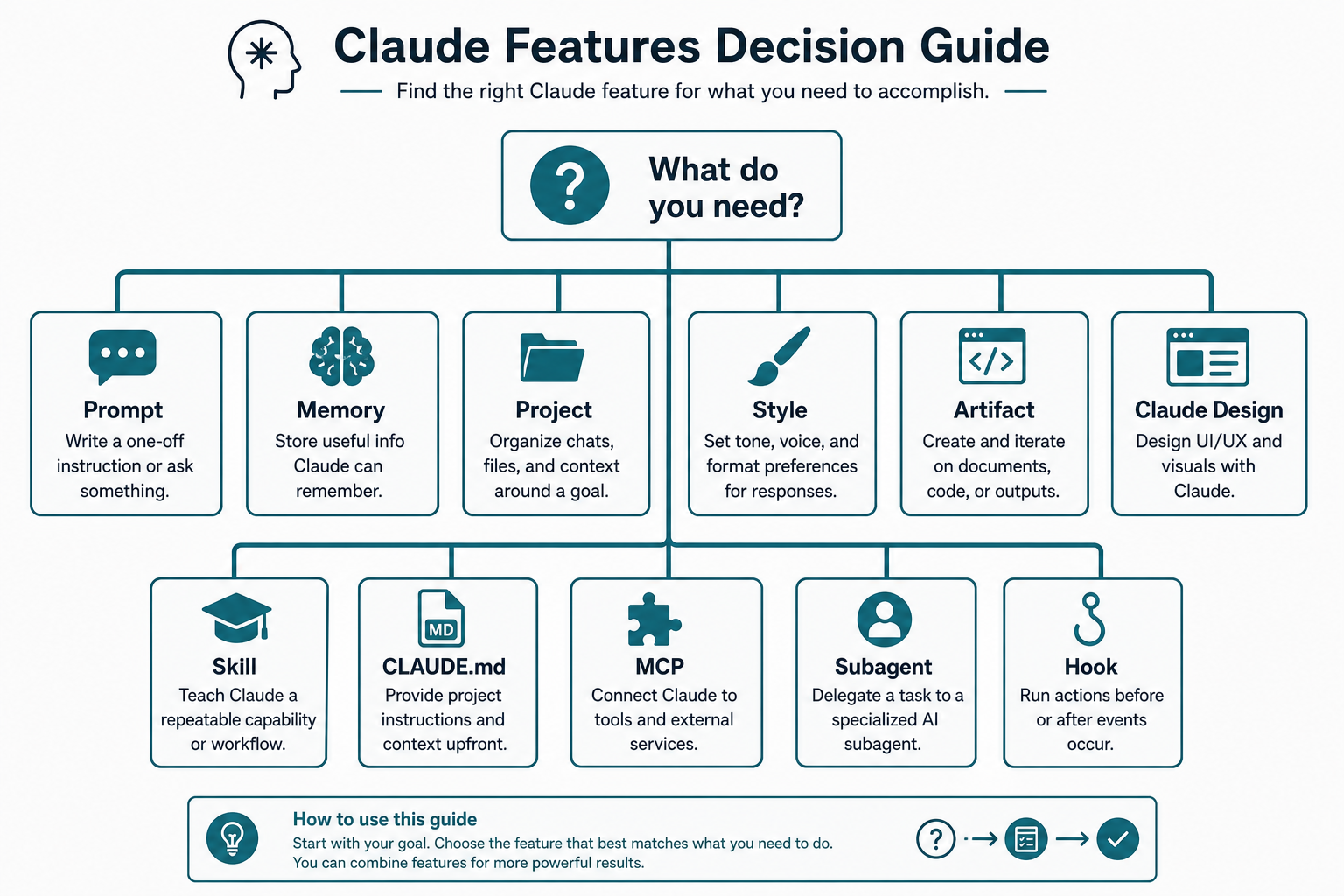
| Need | Use |
|---|---|
| One specific task | Prompt |
| Stable preference about how I work | Memory |
| Continuing context for one area | Project |
| Rules throughout that workspace | Project instructions |
| A particular communication style | Style |
| Reusable doc / tool / interactive app | Artifact |
| Explore or communicate a visual idea | Claude Design |
| Repeated process | Skill |
| Always-on repo rules for coding | CLAUDE.md |
| Controlled access to another system | MCP |
| Focused task needing separate context | Subagent |
| Automatic action at a lifecycle point | Hook |
24. Final lesson
The best Claude workflow is not the one with the most automation. It gives Claude the right context, at the right time, through the right mechanism, with clear boundaries, appropriate validation, and human judgement where it matters.
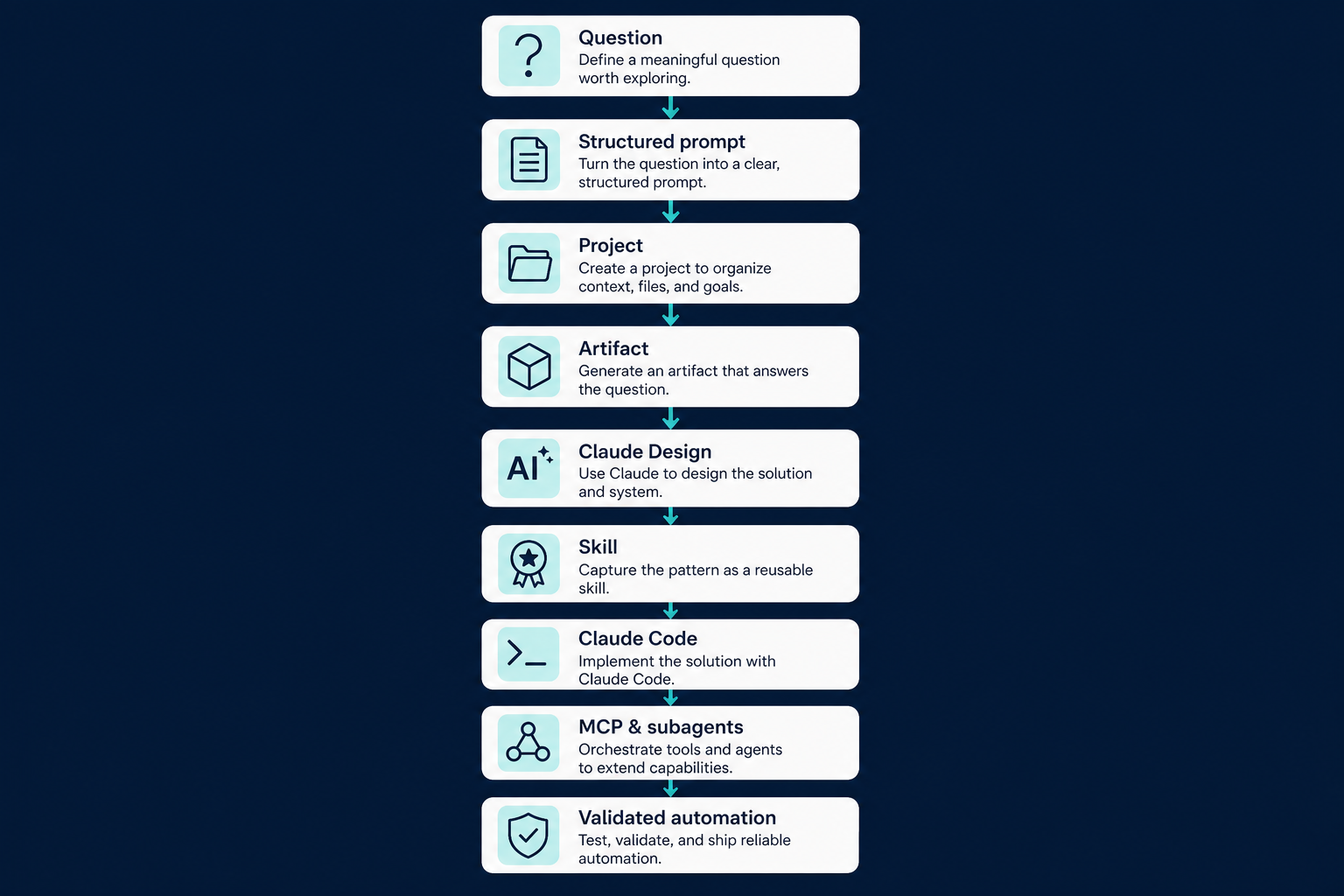
Question
   ↓
Structured prompt
   ↓
Project
   ↓
Reusable Artifact
   ↓
Claude Design
   ↓
Skill
   ↓
Claude Code
   ↓
MCP and subagents
   ↓
Validated automation
Start with better prompts. Organise into Projects. Create Artifacts when outputs should live. Use Claude Design when ideas need to be visible. Create Skills when processes repeat. Add Claude Code, MCP, subagents and hooks only when the work genuinely requires them.
Claude becomes far more useful when it stops being a chatbot you repeatedly instruct and becomes a system that understands how your work should be performed.
References
Ordered from beginner to power user (official Anthropic resources):
- What can I use Claude for?
- What are Projects?
- Create and manage Projects
- Personalisation features
- Chat search and memory
- What are Artifacts?
- Create and edit files with Claude
- Introducing Claude Design
- Get started with Claude Design
- Set up a design system in Claude Design
- What are Claude Skills?
- Use Skills in Claude
- How to create custom Skills
- Complete Guide to Building Skills for Claude
- Official Skills repository
- Agent Skills best practices
- Claude Code overview
- When to use CLAUDE.md, Skills, subagents, hooks and MCP
- Claude Code memory and CLAUDE.md
- Connect Claude Code to tools through MCP
Related playbook series: Coding agents I · II · III · IV.
Discussion
Comments
Share feedback or questions about this page. No account required.
Loading comments…